Car Maintenance Tracker
See how it works - 31 seconds: Pick a car, get its factory schedule, get an email before a job is due, and log it when it is done.
Never miss an oil change or service interval. Track every vehicle, every repair, every cost - free. Works in any browser on your phone, laptop, or Chromebook - and installs on your phone's home screen as an app, no app store needed.
What the tracker does
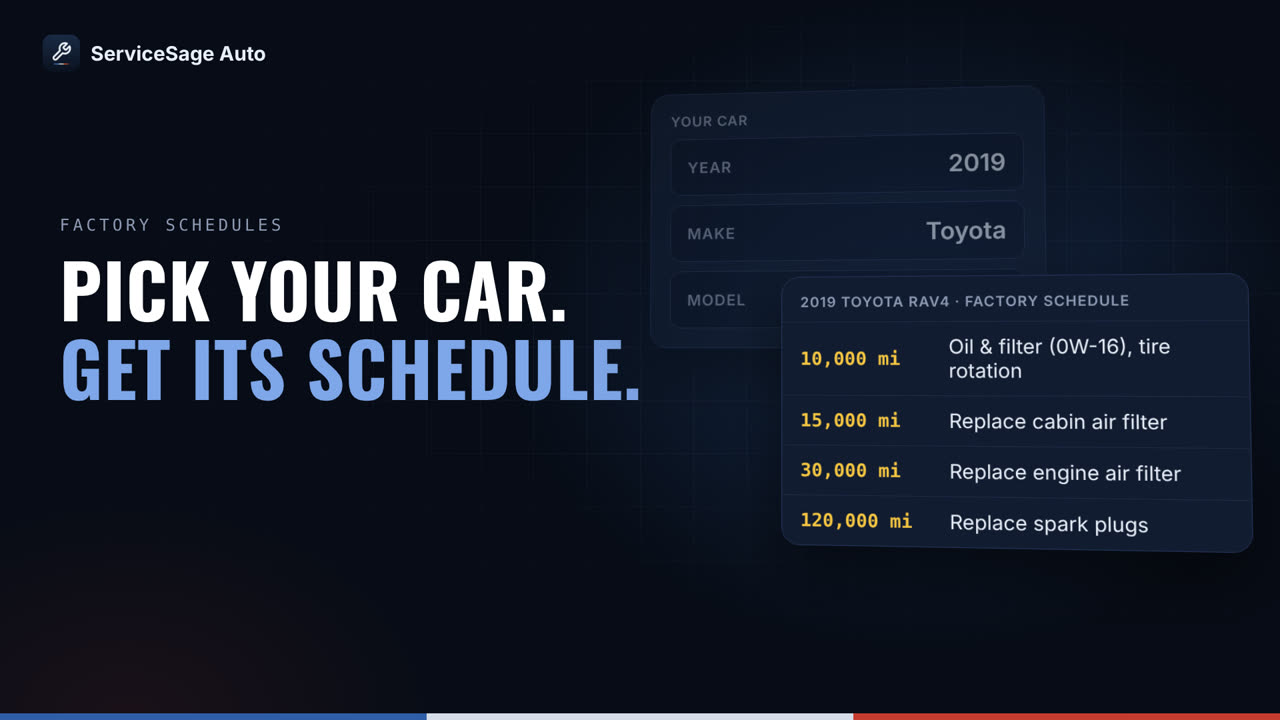
- OEM schedules, pre-loaded. Add your year, make, and model - or just your VIN - and your factory maintenance schedule appears instantly. No manual entry.
- Reminders by miles, hours, or date. Every service can trigger on mileage, engine hours, or calendar time - whichever comes first. Email alerts before you are overdue, not after.
- Cost tracking with a fair-price check (Pro). Log what you paid and see it against typical shop prices for that service - know immediately if a quote was high. Running totals per vehicle, per year, per mile.
- Fuel & MPG log. Log fill-ups in seconds and get MPG trends, fuel cost per mile, and automatic odometer sync that keeps your reminders accurate.
- Torque specs & reset steps built in. Lug nut, drain plug, and spark plug torque specs for popular models - plus step-by-step oil-life reset instructions right on your task board.
- Recall alerts. Every vehicle you track is checked against the NHTSA recall database, so an open safety recall never slips past you.
How it works
- Add Your Vehicle. Enter your year, make, model, and mileage - or decode your VIN. Your OEM schedule loads instantly.
- Log Your Services. Record every oil change, repair, or inspection in seconds, with date, mileage, and notes.
- Stay on Schedule. Get reminders before service is due and never pay for a missed maintenance again.
Better than the spreadsheet you keep meaning to update
Spreadsheet or paper log
- You look up every interval yourself
- Nothing reminds you - you remember, or you do not
- No idea if the shop quote was fair
- MPG math by hand, if ever
- Lost when the notebook (or laptop) goes
ServiceSage tracker
- Factory intervals load automatically
- Email alerts before anything is overdue
- Fair-price check on every logged cost
- MPG and cost-per-mile computed from fill-ups
- Permanent online history you can export anytime
One tracker for every car, mower, and machine you own
One vehicle is easy. Two cars and a mower is where most tracking systems fall apart. Every car, small engine, and machine gets its own schedule, reminders, and service history - free for up to 3, in any mix. Pro covers up to 10; the Team plan covers every vehicle, machine and small engine for one flat $39/month.
Household
2019 Toyota Camry, 2016 Honda Civic, Riding lawn mower. The problem: Two different oil change schedules, plus a mower nobody remembers to service until it will not start. The fix: All three on the free plan. Separate schedules and reminders, one login.
Freelancer / Self-Employed
Personal car, Work truck or van, Generator or pressure washer. The problem: Separating personal vs. business vehicle expenses for taxes is a nightmare. The fix: Start free with up to 3. Pro adds cost tracking per asset and a PDF service record for tax time.
Small Business Owner
Company trucks, Skid steer or excavator, Mowers and small engines. The problem: Spreadsheets that nobody updates, and equipment that goes out overdue for service. The fix: The Team plan covers every vehicle and machine for one flat price, with a fleet dashboard that shows what is overdue. For fleets.
A complete digital service log for each vehicle
A vehicle maintenance log - sometimes called a service ledger or car logbook - is a running record of every service, repair, part, and cost for your vehicle. Here it is kept digitally, organized by date and mileage, so your full service history is in one place instead of a glovebox full of receipts.
Every entry stays, on every plan, with no cap on how many you keep. The log is private to your account and backed up in the cloud. A PDF service report you can hand to a buyer or a mechanic is part of Pro and Team.
On your phone, without an app store
Add ServiceSage to your iPhone or Android home screen and it opens like any other app: its own icon, full screen, and reminders as notifications (iPhone needs iOS 16.4 or later). It installs from the website in under a minute. It is not in the App Store or Google Play yet - it does not need to be.
Get the app on iPhone or Android - no App Store needed
Factory schedules ready to load
Browse the OEM maintenance schedule before you even sign up:
Start tracking free. Running a business fleet? For fleets.
Frequently asked questions
Is ServiceSage Auto a free app for tracking car maintenance?
Yes. It's free for up to 3 vehicles with no credit card required. Because it runs in your web browser, there's nothing to download from an app store - you just sign up and start logging service intervals, oil changes, and repairs.
Does the maintenance tracker work on a Chromebook or in the browser?
Yes. ServiceSage Auto is a browser-based web app, so it works on a Chromebook, Windows PC, Mac, iPhone, or Android - anywhere you have a browser. Nothing has to be installed and there is nothing to keep updated.
Is there a car maintenance tracker app for iPhone and Android?
Yes. ServiceSage Auto installs from the website onto an iPhone (in Safari: Share, then Add to Home Screen) or an Android phone (in Chrome: Install app), with its own icon and reminders as notifications - iPhone needs iOS 16.4 or later for those. It is not in the App Store or Google Play. The steps are at servicesageauto.com/install/.
Can I track service intervals and repairs myself as a DIYer?
Yes - it's built for DIYers who want to track their own work. Log every oil change, fluid, part, and repair, and the tracker shows what's due next based on your mileage and the factory OEM service intervals for your exact year, make, and model.
How is this better than a paper logbook or a spreadsheet?
Unlike a notebook or spreadsheet, ServiceSage Auto auto-loads the OEM maintenance schedule for your vehicle, reminds you before each service is due, stores photos of receipts, and keeps a cloud backup you can't lose or leave in the glovebox.
Does it track what my maintenance costs?
Yes. Log the cost of every service and repair, and ServiceSage Auto shows your real spend per year and per vehicle - useful for budgeting and for deciding when a car is no longer worth keeping. Cost tracking is part of Pro (from $9/month), and every new account gets 14 days of Pro free.
Is there a free auto service ledger or self-serve car log I can use online?
Yes. ServiceSage Auto is a free online auto service ledger - a self-serve car log where you record every oil change, repair, part, and cost yourself. It keeps a running service history per vehicle in your browser, with no spreadsheet to maintain and no app to install.
What website lets DIYers track their own maintenance?
ServiceSage Auto is a website and browser-based app built for DIYers to track their own maintenance. Add your vehicles, log what you do, and it shows what's due next from the factory OEM schedule for your exact year, make, and model - free for up to 3 vehicles.
Does it know my car's factory maintenance schedule?
For popular US models - Corolla, Civic, Camry, RAV4, Tacoma, F-150, Silverado, Accord, CR-V, Prius, Wrangler, RAM 1500, Outback, and more - the full OEM schedule loads automatically. For any other vehicle you can build a custom schedule with your own intervals in a few minutes.
Can I keep my vehicle maintenance log online instead of on paper?
That is exactly what this is: a permanent online service log. Every oil change, repair, and fill-up you record is timestamped with mileage and cost, and the full history stays on every plan. A PDF report to share with a buyer or mechanic is included with Pro and Team, and during an active Pro trial.
How many vehicles can I track for free?
Up to 3 assets on the free plan, in any mix: cars or other vehicles, small engines, or heavy machinery - two cars plus a lawn mower, for example. Free includes each asset's schedule, reminder emails, and unlimited service history. Need more? Pro covers up to 10 (from $9/month), and the Team plan covers every vehicle, machine and small engine for one flat $39/month.
Can I track a lawn mower, generator, or heavy equipment alongside my cars?
Yes. Small engines (lawn mowers, generators, pressure washers) and heavy machinery (skid steers, excavators, tractors) go in the same account as your cars. Vehicles track by mileage; engines and machines track by engine hours. Every asset counts toward the same plan limit.
I have a mix of personal and business vehicles - can I separate them?
You can label and organize assets however makes sense for you. Cost tracking per asset, which makes separating personal and business expenses easy, is part of Pro and Team - and every new account gets 14 days of Pro free, no card required.
What if I run a business fleet?
The Team plan is built for that: every vehicle, machine and small engine for one flat $39/month, with unlimited users, a fleet dashboard, and CSV export. See the fleet plans at servicesageauto.com/fleets/.